Live presenters on your screens
Invite a speaker with a link. They check their camera backstage, say they are ready, and appear inside the slide you designed — no capture card, no cable.
The Wunderframe team 2 min read
Until today, getting a person onto a venue screen meant a camera operator, a capture card and a cable run nobody wanted to tape down. From today, it means a link.
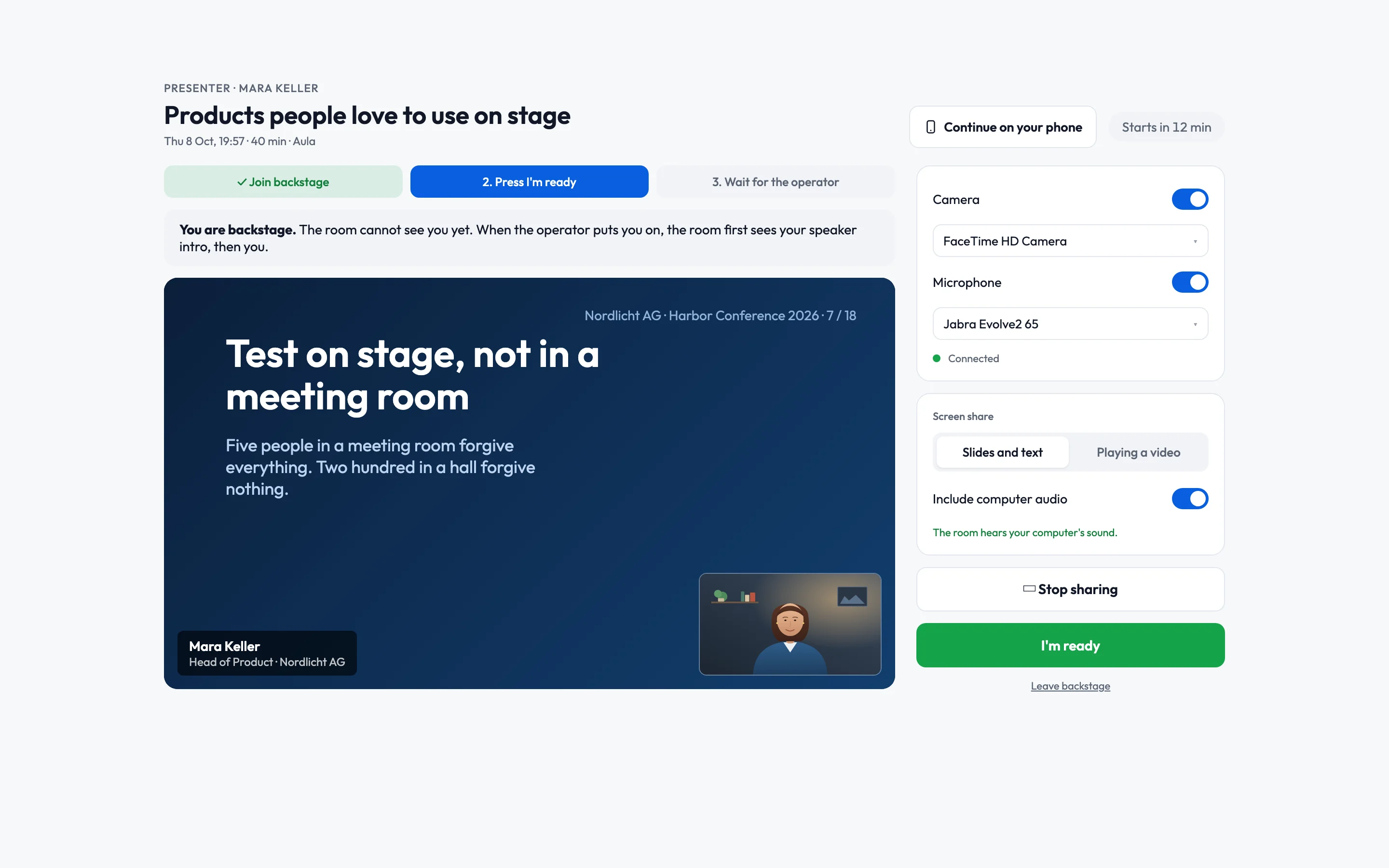
Wunderframe now brings live presenters onto your screens: a speaker opens a personal link from wherever they are, checks their camera in a waiting room, says they are ready — and appears inside the slide you designed, on the stage you chose.
How it works
You plan a session — a dated slot on a stage — and pick the scene that frames the presenter: your branding, a lower third with their name and title, the sponsor logos. Then you send each presenter their invite link.
Presenters never need an account. The link opens a page with a device check, a preview of how they will be framed, and one big button: I’m ready. Backstage, you watch every presenter’s video and microphone level before anything reaches a screen.
The picture on the wall only ever comes from a live session. Backstage stays backstage.
Rehearse like it is the day
Rehearsals use the same link and the same waiting room, and nothing reaches a screen. Plan one a week before, or press Rehearse now while a speaker is on the phone with you — Wunderframe opens a rehearsal from this minute and hands you links to send right away.
Two ways to go live
- When the presenter is ready — the stage switches to them the moment they press I’m ready. If a show is running, the controller gets a one-click Presenter ready — Take instead, so nobody cuts into a cue by accident.
- At the start time — presenters wait backstage and the slide comes up on the minute.
When they are done, Session finished moves the screen on: back to the call sheet, to the next cue of your show, or to a story you picked.
Plan it from your own tools
Agendas rarely start in Wunderframe. The new REST API lets your speaker portal import presenters with their photos, book sessions by your own ids, and create invite links and rehearsals — the same things an operator does in the app.
Get started
Live presenters are available in every workspace today. Read Presenters and sessions for the operator guide, and send your speakers What to expect as a presenter along with their link.
Related posts
Live speakers without surprises: a playbook for event managers
Rehearsals, the backstage link, a network you control, operators for every room and a Q&A that knows who picks the questions. What to prepare with your speakers before the day, and how the day itself runs.
Keynotes that wait for the speaker
A morning of three keynotes in one hall, and why the screen should move on when a person is ready, not when a timer runs out. Timed stories and live sessions, and how to tell which one you need.
Put your photo booth’s pictures on the event’s wall
For photographers and photo booth operators: how your own booth can post its shots to an event’s polaroid wall through the new Engagement API, and hand each guest a take-home link — what it takes, and where the limits are.